The Cue Review Tool is the best way to ensure your cuesheet is just how you want it. Double check each cue to ensure accuracy and make any changes or corrections you like. You can even add in custom cues and POI while in Cue Review.
_____________________________________________________________________
Download the Ride with GPS mobile app
_____________________________________________________________________
The Cue Review Tool is an Advanced Route Planning feature. You can unlock this set of features with a Premium subscription.
Use Cue Review
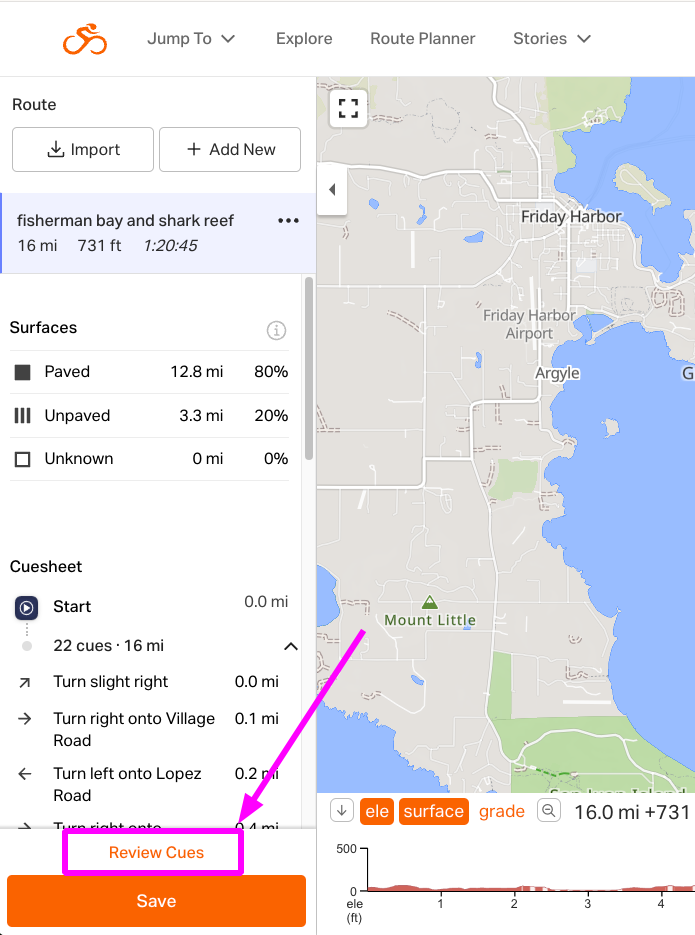
The Cue Review Tool can be accessed via the website Route Planner. Create a new Route or open an older one and then click Review Cues in the lower left corner.
- On the right side of your screen, you can change the highlighted cue's type, modify the description or note fields, or delete a cue.
- If your cue looks good, click Confirm to move to the next cue.

FAQs
- Can I make changes after the review is complete?
Absolutely. You can make any number of changes after reviewing cues. We recommend reviewing the cues after you've made all your changes and you feel the route is done.
- Why won't the cue review tool fix spurs for me?
Some spurs can be intentional by route planners when including water stops, first aid stations, or other features that would require a rider to stop as part of the route. If you'd like to fix errant spurs in your route, check out the Split, Combine, or Change an Existing Route help article.
- I have a Free or Starter account, but why can't I see the Review button?
The Cue Review Tool is available for Premium subscribers and all Organization accounts.